
How to Build an AI Email Control Tower Entirely Within GCP

Introduction: Why Build Your Own Email Agent?
You may have seen SaaS startups that promise to manage your email with AI, or perhaps you've seen influencers post videos about email automation using tools like N8N. These solutions often seem promising, especially if you're a supply chain manager constantly inundated with email updates.
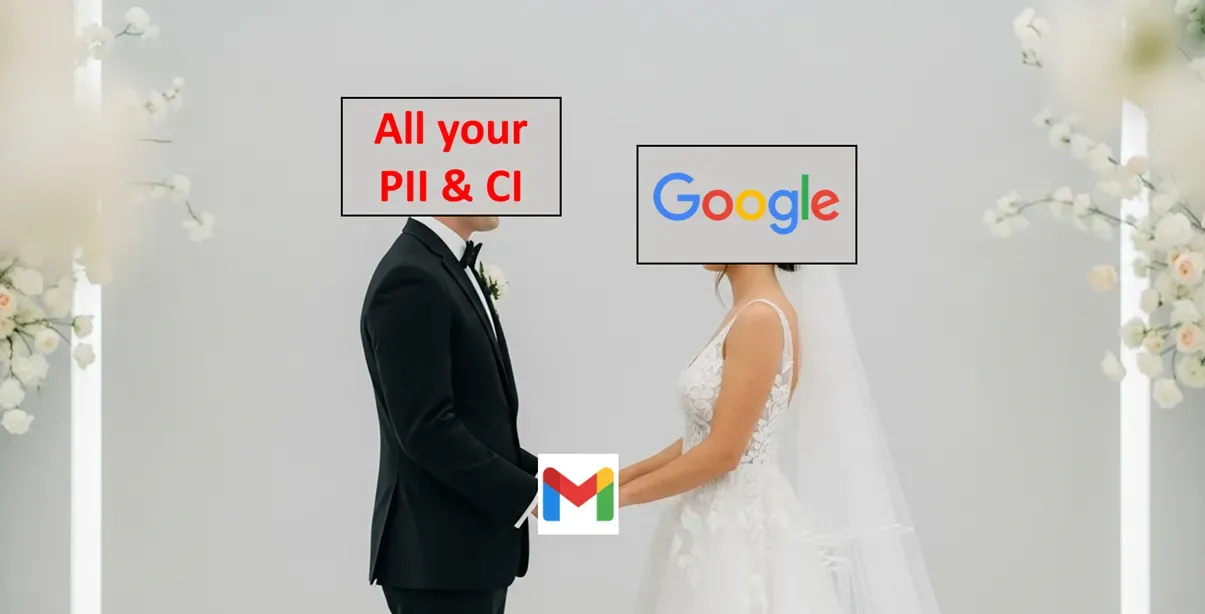
Then you realize there is one problem: would you really entrust a third party with access to all of your email data?
Even if you would, will your company approve it? Who on the IT team even has to time to review this.
In our experience, data security is a top concern for email automation in businesses—and for good reason. Granting access to your company's email data can mean granting access to almost everything in your business.
That's precisely why we help companies deploy email automation with full control, right in their own Google Cloud Platform (GCP) project. This means if you're already using Gmail, Google remains the only other party you trust with your email data.
The Key Benefits:
- Security: Eliminate the need for third-party tool approvals from your IT team. By setting up a project in Google Cloud Platform, your email data never leaves Google's secure data centers.
- Cost: Avoid new software subscriptions. You only pay for the compute and storage you use in GCP, which for many mid-size companies will likely be less than $10 a month.
If you use Microsoft for email, stay tuned for another article coming soon 😎
The Architecture: How it All Works
First, check out the control tower in action:
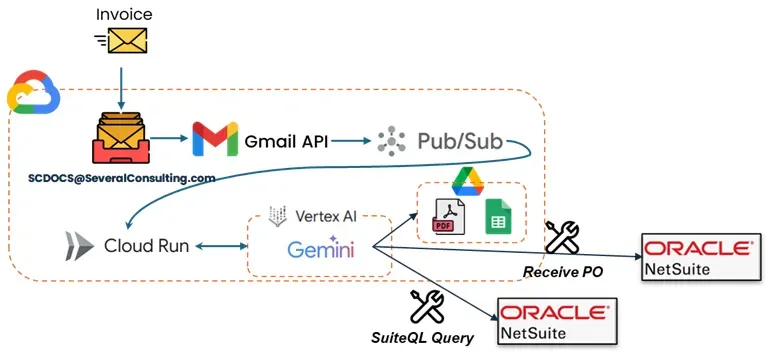
Here's how the magic happens:
Gmail API & Pub/Sub:
In GCP, you'll first enable the Gmail API and create a Pub/Sub topic (e.g., gmail-automation). Then, enable "watch" on the Gmail API for the inboxes you want to monitor, specifying the Pub/Sub topic you created.
def start_watch(self, email: str) -> bool:
    """Start/renew Gmail watch for a user."""
    service = self.get_gmail_service(email)
    if not service:
        self.results[email] = "Authentication failed"
        return False

    request_body = {
        'labelIds': ['INBOX'],
        'topicName': PUBSUB_TOPIC_NAME
    }

    try:
        response = service.users().watch(userId='me', body=request_body).execute()
        history_id = response.get("historyId")

        if history_id:
            self.update_watch_status(email, 'active', history_id)
            print(f"Gmail watch started for {email} with historyId: {history_id}")
            self.results[email] = "Watch started successfully"
            return True
        else:
            print(f"No historyId returned for {email}")
            self.update_watch_status(email, 'error')
            self.results[email] = "Failed: No historyId returned"
            return False

    except Exception as e:
        print(f"Failed to start watch for {email}: {e}")
        self.update_watch_status(email, 'failed')
        self.results[email] = f"Failed to start watch: {str(e)}"
        return False
Process Emails in Cloud Run:
Next, deploy a function in Cloud Run and specify the Pub/Sub topic as its trigger. This is where things get a bit tricky: the Pub/Sub topic doesn't directly send the content of each new email. Instead, it sends a message every time a change occurs in your inbox (new message, deleted message, label changes, etc.). The message content is simply the inbox email address (e.g., scdocs@severalconsulting.com) and a unique HistoryID. You then need to use a history().list function, specifying historyTypes=['messageAdded'], to retrieve new emails that have arrived since your last unique HistoryID.
class GmailHistoryTracker:
"""User-specific Gmail History ID tracking using Firestore only"""
def init(self, email):
self.db = firestore.Client()
self.doc_ref = self.db.collection(FIRESTORE_WATCH_COLLECTION).document(email)

def get_last_history_id(self):
    try:
        doc = self.doc_ref.get()
        if doc.exists:
            data = doc.to_dict()
            if data:
                print(f"📖 Retrieved last history ID from Firestore: {data.get('last_history_id')}")
                return data.get('last_history_id')
    except Exception as e:
        print(f"⚠️ Failed to read from Firestore: {e}")
    return None

def store_history_id(self, history_id):
    try:
        self.doc_ref.set({
            'last_history_id': str(history_id),
            'updated_at': firestore.SERVER_TIMESTAMP,
            'processed_count': firestore.Increment(1)
        }, merge=True)
        print(f"💾 Stored history ID {history_id} in Firestore")
    except Exception as e:
        print(f"⚠️ Failed to store in Firestore: {e}")

def get_changes_since_last(self, service, current_history_id):
    last_id = self.get_last_history_id()
    if not last_id:
        print("🔄 First time setup - storing current history ID")
        self.store_history_id(current_history_id)
        return []
    print(f"🔍 Fetching changes from {last_id} to {current_history_id}")
    try:
        response = service.users().history().list(
            userId='me',
            startHistoryId=last_id,
            historyTypes=['messageAdded'],
            labelId="INBOX",
            maxResults=500
        ).execute()
        changes = response.get('history', [])
        print(f"📬 Found {len(changes)} history records")
        self.store_history_id(current_history_id)
        return changes
    except Exception as e:
        print(f"❌ Error fetching history from {last_id}: {e}")
        if "404" in str(e) or "Invalid historyId" in str(e):
            print("🔄 History ID expired, resetting to current")
            self.store_history_id(current_history_id)
            return []
        raise
AI Email Management in Cloud Run:
We utilize the process-email function (described above) for initial email content gathering and basic filtering (based on keywords, sender, etc.). This function can then invoke subsequent functions to apply more complex processing using Gemini in Vertex AI.
def extract_invoice_details_from_attachment(self, file_path: str) -> InvoiceDetails:
"""Extract invoice details from attachment using Gemini"""
try:
if not self.is_processable_attachment(file_path):
print(f"Skipping unsupported file type: {file_path}")
return InvoiceDetails(invoice_number="", payment_amount="")
def extract_invoice_details_from_attachment(self, file_path: str) -> InvoiceDetails:
"""Extract invoice details from attachment using Gemini"""
try:
if not self.is_processable_attachment(file_path):
print(f"Skipping unsupported file type: {file_path}")
return InvoiceDetails(invoice_number="", payment_amount="")

file_bytes = pathlib.Path(file_path).read_bytes()

        # Determine MIME type
        file_extension = pathlib.Path(file_path).suffix.lower()
        mime_type_map = {
            '.pdf': 'application/pdf',
            '.jpg': 'image/jpeg',
            '.jpeg': 'image/jpeg',
            '.png': 'image/png',
            '.gif': 'image/gif',
            '.webp': 'image/webp',
            '.tiff': 'image/tiff',
            '.bmp': 'image/bmp'
        }
        mime_type = mime_type_map.get(file_extension, 'application/octet-stream')

        response = self.vertex_client.models.generate_content(
            model="gemini-2.0-flash",
            contents=[
                types.Part.from_bytes(
                    data=file_bytes,
                    mime_type=mime_type,
                ),
                "Extract the invoice details from this document. Focus on purchase order number, invoice number, due date, payment amount, vendor name, invoice date, description, tax amount, and total amount. If this is not an invoice document, return empty values.",
            ],
            config=types.GenerateContentConfig(
                response_mime_type='application/json',
                response_schema=InvoiceDetails,
            )
        )

        parsed_details: InvoiceDetails = response.parsed
        # print(f"Extracted invoice details: {parsed_details.invoice_number}")
        return parsed_details

    except Exception as e:
        print(f"Error extracting invoice details from {file_path}: {e}")
        return InvoiceDetails(invoice_number="", payment_amount="")
Next Steps:
The code snippets above provide a glimpse into building an AI Email Control Tower, and we hope they are helpful in illustrating the concepts and steps required.
Our team has developed a full code base to set up the foundational infrastructure in GCP, but the true value comes from customizing the control tower to your unique operational needs. This is where our deep expertise in supply chain and operations management comes into play, enabling us to help you design and implement highly effective automated processes.
If you're interested in exploring how an AI Email Control Tower can transform your operations, please don't hesitate to reach out. You can email us at jesse@severalmillers.com or book a meeting here to get started.
Sources and Further Reading
- Google Cloud Functions Documentation - Complete guide to serverless functions on GCP
- Vertex AI Platform Documentation - Everything you need to know about Google's AI platform
- Gmail API Push Notifications - Technical details on Gmail's real-time notification system
- Google Cloud Pub/Sub - Messaging service documentation and best practices
- OAuth 2.0 for Google APIs - Authentication and authorization guide
- Firestore Documentation - NoSQL database for storing application state
- Google Cloud Secret Manager - Secure credential storage and management